API Access
Pixee Enterprise Server provides a REST API for programmatic access to your Pixee installation. This page explains how to authenticate with the API and access available resources.
There are two ways to authenticate, and which one you want depends on whether a person is present:
| Per-user login | Shared API key | |
|---|---|---|
| Who it identifies | the individual, by name | nobody — one key for the whole deployment |
| Permissions | from your identity provider groups | none; all callers are equivalent |
| Revoking one person | remove them in your IdP | not possible without rotating for everyone |
| Works unattended (CI) | no — needs a browser sign-in | yes |
Prefer the per-user login whenever someone is at a keyboard, so API activity is attributable to a real person. Use the shared key for CI and automation, where nobody can complete a browser sign-in.
Per-User Access with the Pixee CLI
The Pixee CLI signs you in through your deployment's identity provider and holds a short-lived token on your behalf:
pixee auth login --server https://<your-pixee-server>
This prints a URL to approve in your browser. Because approval happens out of band, the browser does not have to be on the machine running the CLI — you can log in over SSH and approve from your laptop, as long as that device can reach your deployment.
Then retrieve a currently-valid bearer token whenever you need one. It refreshes itself, so scripts and coding agents can call this repeatedly without re-authenticating:
TOKEN=$(pixee auth token --server https://<your-pixee-server>)

curl -H "Authorization: Bearer $TOKEN" \
  https://<your-pixee-server>/api/v1/users/me
Your roles come from identity-provider group membership, so a token carries exactly the permissions
your account has — see Authentication for how groups map to Pixee
roles. pixee auth status shows which deployments you are signed in to and when each session
expires.
The same token also reaches the observability endpoints; see Programmatic Access with the Pixee CLI.
Retrieving Your API Key
The shared API key is a single value for the whole deployment. It identifies no one, so prefer the per-user login above for interactive work and reserve this for CI and automation.
To access the Pixee API, you need to retrieve your API key from the admin console.
Step 1: Access the Admin Console
Navigate to your admin console:
- Embedded Cluster:
https://<your-domain>:30000 - Helm Deployment: Access via the configured admin console endpoint
Log in with your admin credentials.
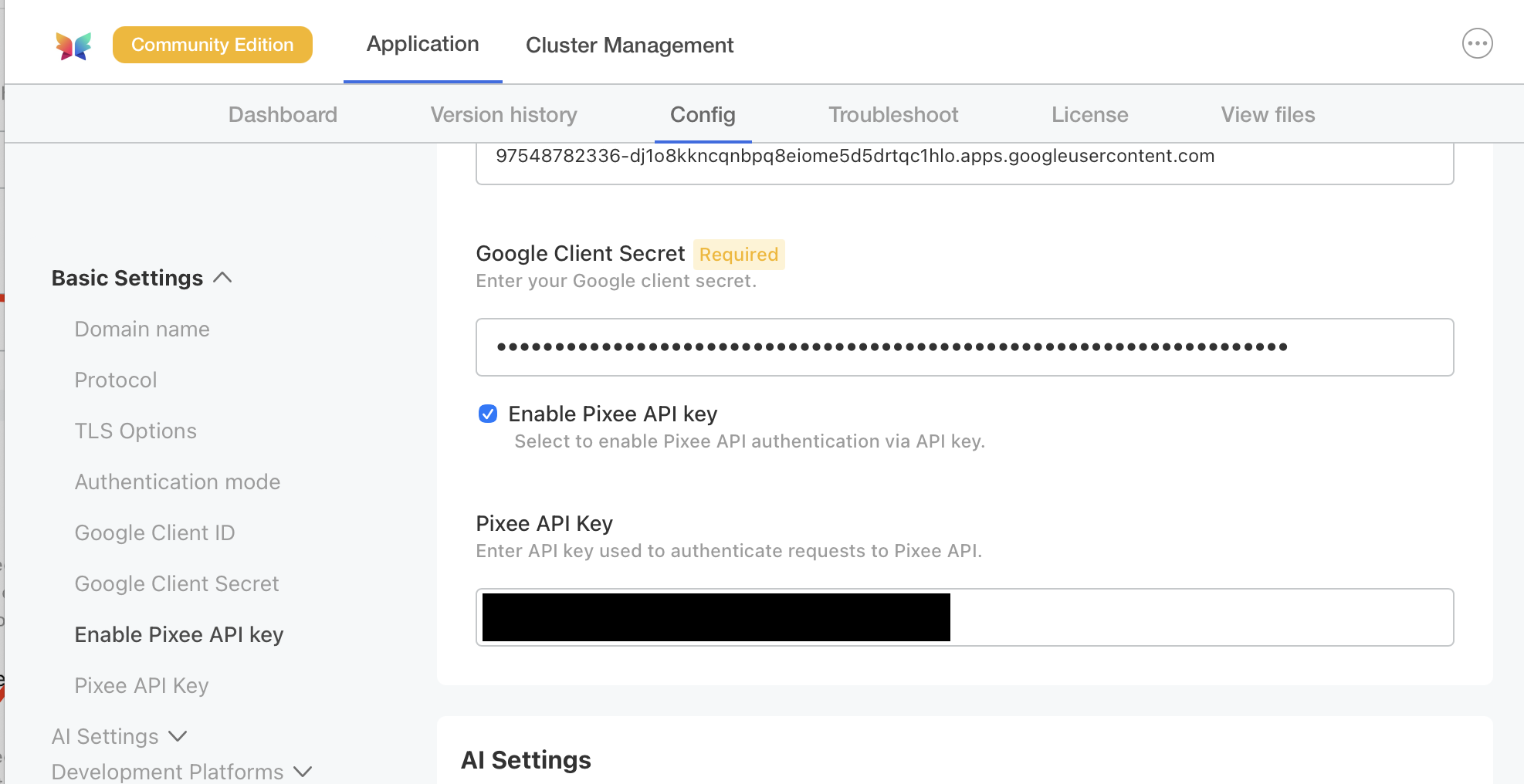
Step 2: Enable and Retrieve the API Key
- Select the Config tab in the admin console
- Scroll to the Authentication section
- Check the Enable Pixee API key checkbox to enable API authentication
- Copy the value from the Pixee API Key field
Tip
Store your API key securely. Treat it like a password and avoid committing it to version control or sharing it in insecure channels.
Authentication
The Pixee API uses Bearer token authentication. Include your credential — either a per-user token
from pixee auth token or the shared API key — in the Authorization header of each request.
Example: cURL Request
curl -H "Authorization: Bearer <your-api-key>" \
  https://<your-pixee-server>/api/v1/openapi
Example: Python Request
import requests

headers = {
    "Authorization": "Bearer <your-api-key>"
}

response = requests.get(
    "https://<your-pixee-server>/api/v1/openapi",
    headers=headers
)
API Resources
Pixee Enterprise Server provides two resources for exploring and integrating with the API:
HAL Browser
URL: /api/browser
The HAL Browser provides an interactive web interface for exploring the API with real data from your Pixee installation. Use it to:
- Discover available API endpoints
- Understand the structure of API responses
- Test API calls interactively
OpenAPI Specification
URL: /api/v1/openapi
The OpenAPI specification provides a machine-readable description of the API. Use it to:
- Generate client code in your preferred programming language
- Import into API testing tools like Postman or Insomnia
- Build integrations with automated tooling
To download the specification:
curl -H "Authorization: Bearer <your-api-key>" \
  https://<your-pixee-server>/api/v1/openapi > openapi.json